
AI Agents: AI Strategies For Business & Content
AI agents are the most important disruption, and growth can be used for business growth by automating complex tasks, personalising customer experiences, and continuously optimising marketing efforts to boost website traffic and conversion rates. By reasoning, planning, and acting autonomously, these agents can free up human teams to focus on strategy and creative work.
What you need and your KPIs
1. Communities and social media growth
2. Funnels/ segments- conversion
3. Traffic – Ahrefs growth
4. SEO link building growth hacking
5. Websites WordPress / Strapi optimisation
How AI agents increase traffic and conversions
Increase traffic
- Hyper-personalised content: Agents can analyse your target audience’s behaviour, search queries, and content consumption to generate highly relevant and tailored content. They can also:
- Scale content creation: Produce variations of emails, social media posts, and product descriptions at scale, ensuring every piece of content is targeted to a specific audience segment.
- Optimise for search engines: Continuously monitor search trends and automatically update website content with relevant keywords, meta tags, and internal links to improve rankings.
- Predictive ad campaigns: Instead of manual adjustments, AI agents can continuously optimise paid media campaigns in real time. They can automatically:
- Target the right audience: Use machine learning to analyse customer data and forecast which users are most likely to convert.
- Adjust bidding: Automatically reallocate budgets to top-performing ad creatives and channels.
- Smart social media automation: AI agents can listen for brand mentions, engage with users, and automatically respond to common questions across social media platforms, ensuring 24/7 engagement.
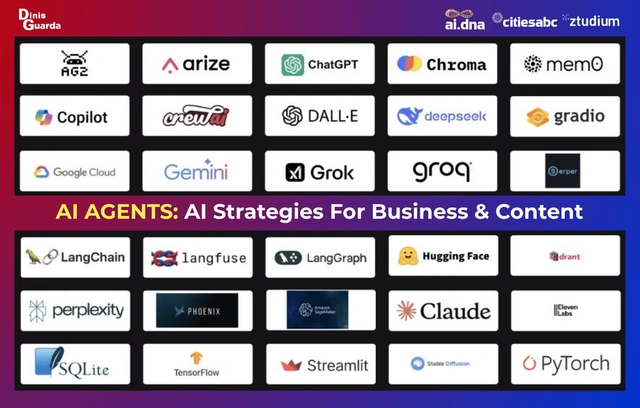
Top AI agent platforms by category
Cloud platforms (for enterprises)
- Google Cloud Vertex AI Agent Builder: Best for enterprises invested in the Google ecosystem. It provides a managed runtime, deep integration with Google’s stack, and built-in features like Retrieval-Augmented Generation (RAG) and memory.
- Microsoft Copilot Studio: Ideal for enterprises on the Microsoft stack. This no-code platform offers deep integration with Microsoft 365, Teams, and Azure Active Directory, complete with enterprise-grade governance controls.
- AWS Bedrock AgentCore: Best for large enterprises already on Amazon Web Services. This new framework offers a modular design and serverless scalability with strong infrastructure support from the AWS ecosystem.
- Vellum AI: A cloud-agnostic platform built for enterprises that need to co-build AI agents with both technical and non-technical staff. It focuses on production reliability with built-in tools for versioning, evaluation, and observability.
Open-source frameworks (for developers)
- LangChain: The most popular open-source framework, known for maximum flexibility and a huge ecosystem. It’s a developer-first tool for building highly customizable agents from modular components.
- AutoGen: A framework by Microsoft for building multi-agent systems where multiple AI agents collaborate to solve complex tasks. It’s ideal for developers needing to orchestrate autonomous workflows.
- CrewAI: Specialises in “team of agents” workflows with role-based specialisation. It is best for developers who want to orchestrate collaborative agents with specific tasks.
- LlamaIndex: Focuses on Retrieval-Augmented Generation (RAG) to connect large language models (LLMs) with external data. It is crucial for building knowledge-centric agents that reference vast document stores.
- LangGraph: A powerful extension of LangChain that uses a graph-based structure for complex, multi-step agent reasoning. It is the top choice for complex, production-grade agent workflows with cycles.
Low-code/No-code platforms (for business users)
- Dify: A simple, low-code platform for rapidly prototyping and deploying AI workflows and agents. It’s user-friendly and includes model switching and pre-built connectors.
- AgentGPT: A completely free, browser-based tool for creating autonomous AI agents. Users can set a goal, and the agent will break it down into tasks to complete.
- Botpress: A no-code platform specifically for creating conversational AI agents. It provides a visual interface for building, deploying, and tracing agent workflows.
- Voiceflow: Specialises in creating conversational AI agents, particularly voice assistants and chatbots. It offers a visual builder for designing multi-modal experiences.
Specialised AI agent platforms
- Lindy: A no-code platform for building multi-agent workflows to automate repetitive tasks like email management and meeting notes.
- 11x: Provides specialised AI agents for automating full-cycle sales processes, from outbound prospecting to inbound lead qualification.
- Bland: Automates phone calls with ultra-realistic AI voice agents for handling customer conversations and sales.
- Harvey: Automates legal workflows, including research, drafting, and analysis, for law firms and professional service teams.
How to choose the right platform
The best platform depends on your specific needs and team’s skills. Follow these steps to make an informed decision:
- Define your use case: Determine whether you need to automate a specific process (e.g., sales, customer support), build a custom application, or perform complex research.
- Assess your team’s skills: If your team is non-technical, low-code/no-code platforms like Dify or AgentGPT offer an accessible starting point. Developer-focused frameworks like LangChain require programming knowledge.
- Consider scalability and governance: For enterprise-grade applications, cloud providers like Google Cloud’s Vertex AI or Vellum AI offer the scalability and governance controls necessary for production.
- Evaluate integration needs: Determine what data sources or external tools your agents need to interact with. Platforms like n8n and LangChain offer robust integration options.
Case studies AI Browsers
Perplexity Comet AI Browser Super Agent
Perplexity AI has launched Comet AI Browser, which is transforming into an AI agent called Perplexity Comet.
Perplexity Comet is an AI-powered web browser that combines traditional browsing with agentic AI capabilities to act as a personal assistant. Built on Chromium, the browser is designed to execute multi-step tasks, summarise information, and help users manage their digital lives directly from the browser. It was released for free in October 2025, after an initial launch for premium subscribers.
Key features
Comet moves beyond simple search to perform actions and automate workflows. It can execute tasks through either a main chat window or a contextual sidebar.
- AI-powered web automation: Comet can navigate websites, click buttons, fill out forms, schedule meetings, and send emails on the user’s behalf.
- Contextual assistance: It can summarise web pages, translate text, and answer questions based on the content of the current tab. It can also manage and group open tabs.
- Integration with personal tools: When connected to accounts like Gmail and Google Calendar, Comet can answer questions about your inbox, summarise your schedule, and help you manage your day.
- Personal search and memory: The browser can find information from your past browsing activity and connected documents, acting as a “second brain”.
- Agentic capabilities: The browser features AI agents that can handle complex, multi-step tasks. One example is the “Live Marketing Intelligence Agent,” which can perform a competitive analysis in minutes.
Potential benefits
- Productivity: Users can automate research, scheduling, and shopping workflows that would typically require hours of manual work.
- Fluid interaction: Comet enables a more conversational and seamless internet experience, where users can “think out loud” to perform tasks instead of navigating disjointed applications.
- Speed: Some reviewers report that Comet feels faster than other browsers.
Concerns and drawbacks
- Privacy and security: Because Comet requires access to browsing data and connected apps to function effectively, security experts have noted potential vulnerabilities, such as prompt injection attacks. Perplexity recommends that users adjust privacy settings and consider using a separate Google account for sensitive tasks.
- Reliability: Early user reviews have pointed out that Comet can be buggy and may struggle with more complex or non-standard tasks.
- Data collection: Some users have raised concerns about the company’s data collection policies and the use of stealth web crawlers to bypass robots.txt, a claim Perplexity denies.
What does that mean? It means the AI browser doesn’t just find information; it actually executes the tasks for you. It is like having a team of specialised AI assistants working 24/7.
For beginners, this is the ultimate shortcut. You don’t need to code or spend hours manually copying data.
These 10 agents can automate everything from market research to sales outreach.
Here is your beginner-friendly guide to the 10 most powerful Perplexity Comet agents you can use to automate your work right now.
How to Use Comet:
You can use the application in two main ways:
- Main Chat Window: Use this for more complex, multi-step agentic tasks.
- Assistant Sidebar: Perfect for quick, contextual tasks related to the webpage you are currently viewing.
Category 1: Sales, Leads, and Customer Targeting
If you are in sales, marketing, or business development, these agents are huge time-savers.
1. The Leads Monitoring Agent (Finds Buyers for You)
This agent shifts you from consuming information to generating opportunities. It will scour platforms like Reddit forums for high-intent questions, identify signals that indicate buying intent, and automatically email you a summary of qualified leads.
For example, you can tell the agent to search relevant subreddits for high-intent SEO questions in the past seven days, define the buying criteria, and then summarise the lead details and send them to your email. You can even schedule this task to run on a weekly basis, acting as a mini lead monitor.
2. The Sales Prospecting Agent (Hyper-Personalised Outreach)
Forget generic cold emails. This agent finds companies that match your Ideal Customer Profile (ICP) and drafts hyper-personalised outreach emails.
You give Comet the criteria for the ideal companies you want to work for (e.g., e-commerce business, revenue growth, company size) and ask it to filter companies that match. Once you have identified a contact list, you can tag the list and have the agent draft a personalised email based on research and your provided email formula. The coolest part? You can ask it to save the email as a new draft in your Gmail, ready for your final approval and sending.
3. The Audience Research Agent (What Customers REALLY Want)
The best marketing comes from deeply understanding your audience. This agent digs through social media (like Reddit or YouTube comments) to find real customer pain points. It will browse threads, analyse comments, and generate real audience quotes with identified categories and top pain points.
You can then download this analysis (or import it into Google Sheets) to build better messaging, offerings, and persona profiles. A bonus is that you can even switch to Perplexity Labs and use this research to build an HTML landing page that truly resonates with your target audience.
Category 2: Research, Content, and Automation
If you spend too much time reading tabs and summarising information, these agents are your solution.
4. The Live Marketing Intelligence Agent (Competitor Analysis in 15 Minutes)
Manual competitive analysis used to mean hours spent drowning in tabs and copying data. This agent can analyse multiple competitor sites live and simultaneously extract key insights.
It can retrieve context across different browser tabs. You simply type a prompt asking it to analyse the open tabs, and it will dig into all the key pages, not just the homepage, because it acts as an agent. This process can take as little as 15 minutes instead of hours. What’s more, you can now ask it to create the report and export the research findings directly into a new Google document.
5. The Research Agent (The Ultimate Tab Organiser)
Tired of dozens of cluttered tabs and information chaos?. Comet can turn that mess into an organised workspace.
You can ask Perplexity to group relevant tabs into a dedicated workspace. When inside a research workspace, you can let the agent read and analyse all the open pages. You can ask it to identify the top three to five common themes across sources or implications, saving time spent navigating.
Bonus Tip: You can easily fact-check claims. Just copy the text from an article and ask the agent to perform an initial fact check for you.
6. The Synthesiser Agent (Automated News Database)
Perplexity is excellent at finding timely, real-time sources. This agent finds the most important weekly news (e.g., AI SEO news) and automatically updates your central database, like Notion. You can ask it to find the top five most important news items and enter each item into your structured Notion database (sorted by date). You can even set up a scheduled task to have it run on a weekly basis, fully maximising automation.
7. The Content Brief/AI Search Agent (Beat Google’s AI)
Marketers know AI search is a big deal now. This agent can analyse the Google AI Search results for patterns and best practices.
It is smart enough to expand all the cited search results and dig through them one by one. This saves you time analysing and reverse-engineering the top results yourself. It then comes up with a detailed analysis and can generate an SEO content brief ready for your team to follow up on. You can even schedule it to monitor the top AI search results, potentially saving money on expensive AI rank trackers.
Category 3: Executive and Operational Automation
These agents help you streamline internal processes and hiring.
8. The Conversion Optimisation Agent (Fix Your Website Friction)
Conversion optimisation directly impacts your bottom line. This agent can audit your sales funnel to identify frictions.
Instead of giving it a massive prompt, you can reference a pre-written process document you have open in a tab, detailing how to perform the audit (from product discovery to checkout flow). Comet will follow the instructions, search for the specific product, add it to the cart, and repeat the process for competitors. It provides a detailed analysis of issues and proposes the five top priority fixes. This works for e-commerce, SaaS, or service websites.
9. The Talent Sourcing Agent (Find the Perfect Hire)
Need to hire or find the right partner? This agent searches live job platforms (like onlinejobs.ph) using your detailed criteria.
You can ask it to find 10 qualified candidates using specific criteria, like years of experience, tool proficiency, or salary expectation. The agent does the heavy lifting, digging through profile details and ranking the qualified candidates in a summary table.
10. The Executive Assistant Agent (Admin Tasks Gone)
This agent connects to your Google Workspace to handle administrative tasks.
One immediately useful function is preparing you for meetings. You can ask it to check your calendar for external meetings, research each company/person, and compile all background, news, executives, and conversation starters into a Google document, with each company in a separate tab. It can also handle scheduling, such as searching for the top 10 marketing conferences in the next six months and adding each one to your calendar with title, location, and description.
A Quick Word on Privacy (The Smart Way to Use Comet)
It is important to understand that for an AI browser to be truly effective, it needs context from your browsing, meaning it has to access some of your data.
Perplexity Comet collects more data by default. However, you can minimise this risk by following these two steps:
Adjust Settings: Make sure you adjust the settings to block sensitive site access (like bank accounts or client portals) and stop Comet from sending your search data to improve the product.
Isolate Your Account (Top Recommendation): Create a completely separated Google account and only use it for non-sensitive tasks while using Comet. This ensures complete data isolation.
Perplexity Comet is not just a tool; it is a full-fledged automation engine that can execute tasks that used to take you hours. It is time to stop working harder and start working smarter!
Perplexity Just Unleashed 10 FREE AI Agents That Do Your Entire Job (The “Comet” Shortcut)
https://medium.com/@aakash_7/perplexity-just-unleashed-10-free-ai-agents-that-do-your-entire-job-the-comet-shortcut-249dc3dc0fff–